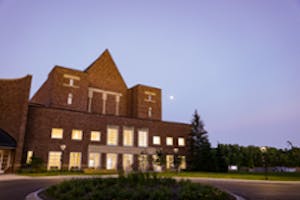
Scholastic Saturdays are offered at our convenient off-campus location at 1200 Red
Fox Road in Arden Hills, affectionately known around here as 'Red Fox' (unless otherwise specified). Click here for a Red Fox map. You can register for each session separately--take what interests you.
Academic Writing and APA Documentation
Bethel is
pleased to offer training on academic writing and APA documentation for all
current CAPS/GS learners. Choose whether
you would like to register for one or both sessions.
Cost: Academic Writing - $70
Documenting your Writing Using APA - $20
Location:
Bethel’s Red Fox site at 1200 Red Fox Road, Arden Hills, MN 55112 (southwest corner of Highway 694 and
Lexington Avenue)
Bring: These are hands-on sessions, so please bring
your laptop if you have one. Laptops
will be available to work on if you are not able to bring your own. You are welcome to bring snacks, beverages,
and a lunch. There will be a 30-minute
lunch break during the Academic Writing session.
Workshop: Academic Writing
This workshop will cover all the basics of writing academic papers. Topics will include:
- learning
what is expected of college-level writing;
- gaining
an understanding of the writing process from pre-writing to final draft;
- reviewing
the essentials of an academic essay;
- discussing
how to avoid plagiarism; and
- improving
your grammar and punctuation so you can edit accurately.
Feel
free to bring a current paper you are working on if you would like immediate
feedback from the instructor.
Workshop: Documenting Your Writing Using APA
This
workshop will cover the basics of APA 6th Edition documentation, which
is the most commonly used method in CAPS/GS courses for citing sources
in academic papers.
Questions? Call 651.635.8088 or email Emily Busta at e-busta@bethel.edu
| Back to Seminars | Register Now |
Career Exploration for Business
Bethel is
pleased to offer Career Exploration for Business for all current CAPS/GS
learners. Choose whether you would like
to register for one, two, or all three sessions.
Cost: FREE!
Location:
Bethel’s Red Fox site at 1200 Red Fox Road, Arden Hills, MN 55112 (southwest corner of Highway 694 and
Lexington Avenue)
Bring: These are hands-on sessions, so please bring
your laptop if you have one. Laptops
will be available to work on if you are not able to bring your own. You are welcome to bring snacks, beverages,
and a lunch. There will be a 30-minute
lunch break between sessions.
Workshop: Navigating the Job Search Process
This workshop will teach you how to conduct an effective job search. Topics covered will be:
- tools
employers use to gather information about potential job candidates;
- how
employers are using social media to recruit candidates;
- newest
trends in writing cover letters;
- social
media strategies for job searching; and
- where
to search for job openings.
Workshop: Effective Resumes for the Business
World
This workshop will teach you how to write an effective resume for the business world.
- Bring
your existing resume and receive help from a resume expert.
- Learn
how to communicate your skills and experiences on a resume.
- See
different resume formats.
Leave
class with an updated professional resume tailored to the positions you desire.
Workshop: Interviewing for Business Jobs
This workshop will cover how to interview successfully so you can get the job you want. Topics covered will be:
- interviewing
techniques that will help you shine;
- practice
answering the most common interview questions; and
- learning how to write
an elevator speech that will give you confidence to speak with employers about
your career goals.
Questions? Call 651.635.8088 or email Emily Busta at e-busta@bethel.edu
| Back to Seminars | Register Now |
Help for English Learners
Workshop: Help for English learners
Bethel is
pleased to offer our Help for English Learners workshop to current CAPS/GS students. Cost: $45
Location:
Bethel’s Red Fox site at 1200 Red Fox Road, Arden Hills, MN 55112 (southwest corner of Highway 694 and
Lexington Avenue)
Bring: A laptop if you have one.Topics covered will include:
- plural versus singular usage;
- subject/verb agreement;
- verb tense; and
- use of articles in the English language.
Questions? Call 651.635.8088 or email Emily Busta at e-busta@bethel.edu| Back to Seminars | Register Now |
Introduction to Bethel's Systems: Moodle, Blink, and Google
Bethel is
pleased to offer training on Moodle, Blink and Google email for all current
CAPS/GS learners.
Cost:
$30
Location:
Frogtown/Summit-University
ModelCities Brownstone Building
849 University Avenue
St. Paul, MN 55104
Bring: This is a hands-on session, so please bring
your laptop if you have one. You are
welcome to bring your own snacks and beverages.
Workshop: Introduction to Bethel's Systems: Moodle, Blink, and Google
Topics will include:
- an
overview of Moodle and hands-on practice completing tasks such as
uploading an assignment, changing your profile, and checking your grades;
- an
overview of Blink and hands-on practice looking up your class schedule,
adding and dropping courses, checking your degree evaluation, looking
at your unofficial online transcript, and finding library and other
academic resources;
- an overview of Google email and hands-on
practice completing tasks such as forwarding your email to another
account, responding to email, setting an auto signature, organizing
email, creating folders, and more; and
- an overview of the Google
calendar features and hands-on practice completing tasks such as
scheduling appointments and calendar reminders.
Questions? Call 651.635.8088 or email Emily Busta at e-busta@bethel.edu
| Back to Seminars | Register Now |
Microsoft Office for Windows Workshops: Word, Excel & PowerPoint
Bethel is pleased to offer Microsoft Office for Windows hands-on learning sessions for all current CAPS/GS learners. Choose whether you would like to register for one, two, or all three sessions.
Cost: $30 each
Location: Bethel's Red Fox site at 1200 Red Fox Road, Arden Hills, MN 55112 (southwest corner of Highway 694 and Lexington Avenue).
Bring: These are hands-on sessions, so please bring your laptop if you have one. Laptops will be available to work on if you are not able to bring your own. You are welcome to bring snacks, beverages, and a lunch. There will be a 30-minute lunch break scheduled between sessions.
Workshop: Introduction to Microsoft Word 2010 for Windows
This workshop will provide you with the basic word processing concepts needed to produce documents for school and work. Topics covered will be:
- user interface: obtaining help, enter text, save, print preview, set up a printer, page layout, page setup, print options, set margins;
- formatting: changing fonts, highlighting text, insert, delete, and rearrange text, undo changes, search and replace text, setting tabs, adding borders and shading, bullets and numbering, setting margins, indents;
- tables: creating a table, formatting a table, adding text to a table;
- editing and proofing a document: spell check, grammar check, thesaurus, word count, customize the auto correct features;
- page appearance: page layout, page borders, adding color, headers and footers, page numbering, page break; and
- shortcut keys: learn the most common shortcut keys.
Workshop: Introduction to Microsoft Excel 2010
for Windows
This
workshop will teach you how to create and edit basic worksheets and
workbooks. Introduction to Microsoft
Word 2010 or prior use with Microsoft Word is a recommended, but not required,
prerequisite. Topics covered will be:
- creating
a worksheet: Explore the user interface and the tabs, obtain help, enter data,
worksheets and workbooks, label the worksheets, save, set the print area,
insert and delete cells, columns and rows, spell check a worksheet, manipulate
data;
- performing calculations: create basic formulas,
calculate with functions, copy formulas and functions;
- formatting
a worksheet: fonts, borders and colors,
change column width and row height; and
- shortcut
keys: learn the most common shortcut keys.
Workshop: Introduction to PowerPoint 2010 for
Windows
This
workshop will teach you how to create effective basic PowerPoint
presentations. Topics covered will be:
- beginning
a presentation: create slides,
background colors, themes, add and delete slides, enter text, and arrange
slides;
- formatting: using the slide master, bullets and
numbering, transitions and animations;
- tables:
create and format tables, insert a table from Microsoft Word;
- charts:
create a column chart, edit chart data, change chart type, insert a chart from
Microsoft Excel;
- adding
images: clip art, picture from file,
word art;
- preparing
to deliver a presentation: spell check,
speaker notes, send a presentation to Microsoft Word, print options; and
- shortcut
keys: learn the most common shortcut keys.
Questions? Call 651.635.8088 or email Emily Busta at e-busta@bethel.edu
| Back to Seminars | Register Now |